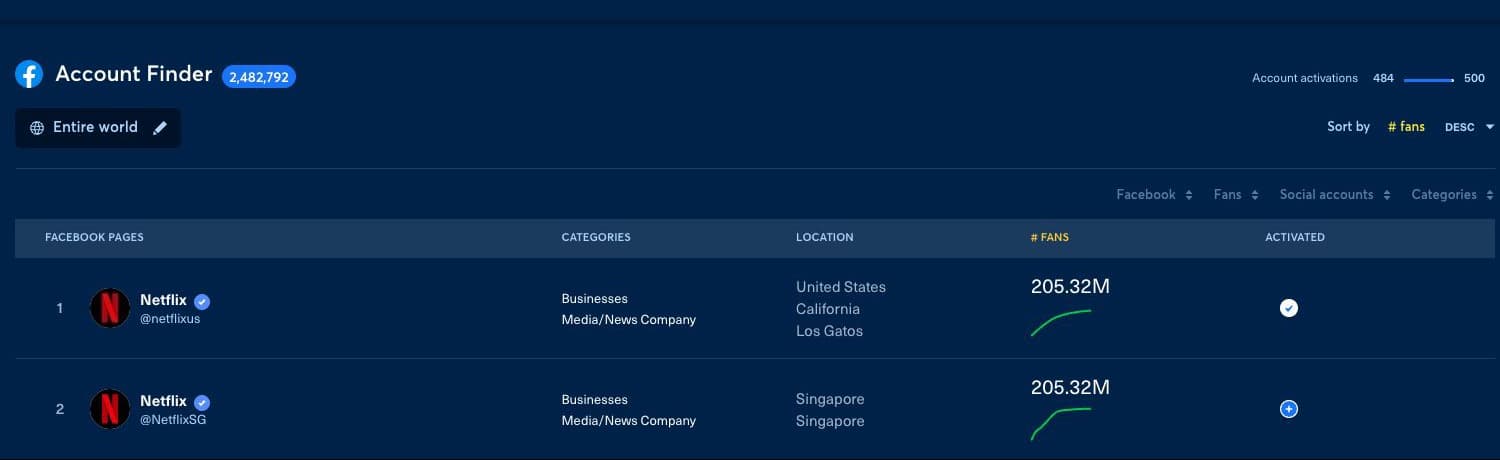
You can activate a public Facebook page from Intelligence by opening the #1 Default Global Data theme and using the Account Finder table. A check mark means that the page is already active; a plus button means that you can add it to your company's Facebook Intelligence allowance.
1. Before you start#
You need access to Intelligence and an available account activation in your company's allowance. The counter displayed beside Account activations shows the number already used and the maximum available. Activating a page adds it to your intelligence dataset; it does not connect the page for publishing and does not require you to be an administrator of that Facebook page.
2. Activate the Facebook page#
- Open Intelligence from the main navigation.
- Open the theme selector and choose #1 Default Global Data.
- Scroll past Organic Listening, Social Listening, and Leaderboard to Account Finder.
- Use the network, fan-count, social-account, category, location, and sort controls to narrow the table.
- Find the exact Facebook page. Check its name, handle, category, and location so that you do not activate a namesake.
- Select the plus button at the end of its row.
- Wait for the row to show a check mark. The page can then be selected in Facebook Intelligence filters after its data has been indexed.
3. If the page cannot be activated#
- The page is not listed: remove overly restrictive filters and search with the exact public page name or handle. See how to find a missing account.
- A check mark is already displayed: the page is active; use the Social accounts filter in Intelligence instead of activating it again.
- No plus button is available: verify the Account activations counter. Your company administrator may need to free an activation or change the subscribed allowance.
- The page was activated but has no results yet: indexing is asynchronous. Refresh later, then verify the selected period and filters before escalating.
If the state still does not change, send support the public Facebook page URL, the time of the attempt, the visible activation counter, and a screenshot limited to the Account Finder row. Never send login credentials, Facebook tokens, or private account data.