Select a period and the accounts you want to analyse. Each export can include at most 20,000 publications matching the selected filters, including when statistics are aggregated by account. There is no 60-day duration cap.
1. Choose your export#
- In Posts, select a period and the accounts and other filters you need. The search must return at least one publication for the export actions to appear.
- Check the Publications count, then open the arrow beside Hide filters.
- Choose Posts export for individual publications and their statistics, or Accounts export for statistics aggregated by social account.
The limit counts the underlying publications in both cases. It is not a limit of 20,000 accounts.
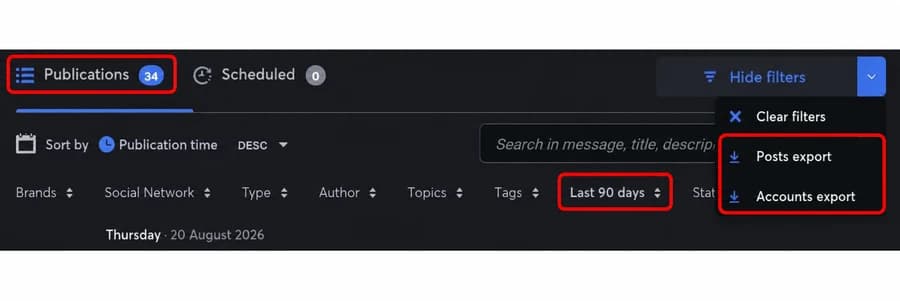
The current English interface shows 34 matching publications over the last 90 days, with both export actions available.
2. What if the result count exceeds 20,000?#
Shorten the date range, select fewer accounts, or refine other filters until no more than 20,000 publications match. Exactly 20,000 publications meets the limit; 20,001 exceeds it.
The number of publications matters, not the duration alone: a 90-day period with 10,000 publications meets the limit, while a 7-day period with 25,000 does not. You do not have to split exports by month.
See also where to find publication performance metrics.
To compare accounts or two periods, see the graphs, grouping and leaderboard tutorial.