A Smart Message can sign a post with the social handles of the article's authors, for example By @camille.example.com and Noah Petit. Nonli reads the author names from the article, then looks up each name in a table you maintain: in Airtable, or directly in the template.
This page uses fictional names and handles. Every snippet below was rendered with Nonli's template engine on 2026-10-26, with test data and without publishing anything.
1. What this does and does not do#
- It maps the known authors of an article to handles. It does not find people or companies quoted in the article text, and it does not guess an account from a name.
- The template writes text. Whether that text becomes a real mention depends on the network (see "Which networks turn the text into a mention" below).
- It does not enable mentions of personal LinkedIn profiles. See Can I mention people or companies in LinkedIn posts?
2. Prerequisites#
- Author names in your articles. Nonli reads authors from the article page, in its structured data (Schema.org
authorin JSON-LD, or microdataitemprop="author"with aname). When the page has none, Nonli falls back to thearticle:authormeta tag, which some sites fill with a profile URL instead of a name: the lookup then uses that URL. In a template they are available asauthors, a list of names. Check the actual values on a real article first: seeauthorsin Which Twig variables are available in Nonli?. Do not usepost.author: it is a single text that can describe the person who created the post in Nonli, not the article author. - The handles of your authors on each network you publish to.
- For the Airtable method, an Airtable token saved in Nonli, and your base ID. Follow How to create an Airtable API secret key for Nonli. Never send your token to support.
3. Method 1: an Airtable table#
3.1. Build the table#
Create a table named Authors with one row per author:
| Name | Bluesky |
|---|---|
| Camille Martin | camille.example.com |
| Léa Dubois | lea.example.com |
| Sam Lefèvre |
- Name is the lookup key. Write it exactly as it appears in
authors, with the same accents, spaces and capital letters. Nonli does not correct or normalise names, so a variant such asLea DuboisforLéa Duboisis not a reliable match. If an author signs in several ways, add one row per spelling. - Keep each name unique. If two rows have the same name, Nonli uses the first one Airtable returns, and the other row is ignored.
- Add one column per network (for example
Bluesky,Mastodon). An empty cell means "no handle for this network". - Store handles without
@: the template adds it. - Use a single line text field for each network column. A linked record, lookup or multiple select field returns a list instead of text, and the template fails instead of falling back to the name.
3.2. Write the template#
1{%- set signature = [] -%}2{%- for authorName in authors -%}3  {%- set handle = airtable('appYourBaseId', 'Authors', 'Name', authorName, 'Bluesky') -%}4  {%- set signature = signature|merge([handle ? '@' ~ handle : authorName]) -%}5{%- endfor -%}6{{ title }}7{%- if signature is not empty %}8
9By {{ signature|join(', ', ' and ') }}10{%- endif %}
Replace appYourBaseId with your base ID, and Authors, Name and Bluesky with your table and column names. airtable(base, table, searchField, searchValue, fieldToReturn) returns the value of fieldToReturn in the first row where searchField equals searchValue, or nothing when there is no such row or the cell is empty.
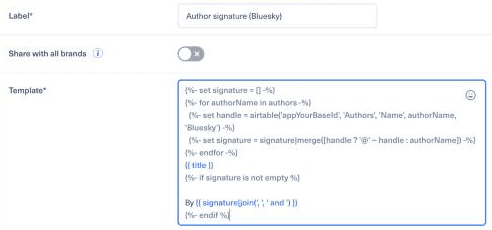
The template pasted into a new Smart message template, before saving. appYourBaseId is a placeholder.
3.3. Expected output#
With the title Budget 2027: what changes and the table above:
authors | Result |
|---|---|
| (none) | Budget 2027: what changes |
Camille Martin | Budget 2027: what changesBy @camille.example.com |
Noah Petit (not in the table) | Budget 2027: what changesBy Noah Petit |
Léa Dubois, Noah Petit, Camille Martin | Budget 2027: what changesBy @lea.example.com, Noah Petit and @camille.example.com |
Sam Lefèvre (empty cell) | Budget 2027: what changesBy Sam Lefèvre |
This template follows these rules:
- No author, no signature. The
Byline is added only when there is at least one author, so a post never ends with a loneBy. - Fallback to the name. An author without a handle keeps their full name, so every author is still credited.
- Order is kept. Authors appear in the order of the article, separated by commas, with
andbefore the last one.
3.4. Variant: show only matched authors#
If you prefer to credit only the authors who have a handle, skip the others:
1{%- set handles = [] -%}2{%- for authorName in authors -%}3  {%- set handle = airtable('appYourBaseId', 'Authors', 'Name', authorName, 'Bluesky') -%}4  {%- if handle -%}5    {%- set handles = handles|merge(['@' ~ handle]) -%}6  {%- endif -%}7{%- endfor -%}8{{ title }}9{%- if handles is not empty %}10
11By {{ handles|join(', ', ' and ') }}12{%- endif %}
With Léa Dubois, Noah Petit, Camille Martin, the result is By @lea.example.com and @camille.example.com. With only unmatched authors, there is no By line. Choose this variant knowingly: it leaves out authors without a handle.
3.5. Variant: sign only when every author matched#
Some teams prefer all or nothing: the signature is added only when every author has a handle, and omitted completely otherwise. Keep the loop of the previous variant and change only the condition:
1{%- if handles is not empty and handles|length == authors|length %}With Léa Dubois, Camille Martin, the result is By @lea.example.com and @camille.example.com. With Léa Dubois, Noah Petit, Camille Martin, there is no By line at all, because Noah Petit has no handle.
| Policy | Unmatched author | Best when |
|---|---|---|
| Fallback to the name (main template) | Credited by name | Every author must always be credited |
| Show only matched authors | Left out | Only handles matter, partial credit is acceptable |
| Sign only when every author matched | Whole signature left out | A partial signature would be misleading |
None of these is a Nonli default: the template decides, so choose the policy that suits your editorial rules.
4. Method 2: a table inside the template#
For a few authors, you can keep the table in the Smart Message itself, without Airtable. The input (authors) and the fallback rule are the same as in method 1:
1{%- set blueskyHandles = {2  'Camille Martin': 'camille.example.com',3  'Léa Dubois': 'lea.example.com',4  'Alex Moreau': 'alex.example.com',5} -%}6{%- set signature = [] -%}7{%- for authorName in authors -%}8  {%- set handle = blueskyHandles[authorName] ?? null -%}9  {%- set signature = signature|merge([handle ? '@' ~ handle : authorName]) -%}10{%- endfor -%}11{{ title }}12{%- if signature is not empty %}13
14By {{ signature|join(', ', ' and ') }}15{%- endif %}
It gives the same results as method 1 for the same names: for example Camille Martin, Noah Petit gives By @camille.example.com and Noah Petit. Names are matched exactly: Lea Dubois (without accent) or camille martin (lower case) find nothing and are printed as written.
This method is an example to adapt, not a configuration copied from a customer.
4.1. Which method to choose#
| Airtable | Table in the template | |
|---|---|---|
| Where you edit the mapping | In one Airtable table | In each template |
| Shared by several templates | Yes: one change applies everywhere | No: each copy of the template must be updated |
| Needs an Airtable token | Yes | No |
| Best for | A newsroom with many authors | A few stable authors |
Neither method changes which mentions a network accepts.
5. Test before publishing#
In the Smart Message template editor, test the template with representative articles before saving: an article without author, one author with a handle, one without, and several authors. Then test a non-production post end to end, published by a bot: Bluesky handles are only turned into mentions in bot publications (see below). See How to make a Smart Message.
Check the result for what it really contains:
- a name (
Noah Petit): plain text; - a handle (
@camille.example.com): text that some networks can turn into a mention; - a profile URL: a link, not a mention;
- a clickable mention: only visible on the published post, and only if the network created it.
6. Which networks turn the text into a mention#
- Bluesky: when a bot publishes a post, Nonli looks up each full handle written in the message, such as
@camille.example.com. When the account is found, Nonli publishes a real Bluesky mention. When it is not found, the text stays plain. In a post you create manually, typed handles are not converted: select the account in the editor's mention suggestions instead. Use the full handle, including its domain (for examplename.bsky.social), and do not put punctuation such as a full stop right after it: it would be read as part of the handle. - LinkedIn: a handle or name written by a template stays plain text. Nonli creates LinkedIn mentions only for company pages selected in the post editor, and does not support personal-profile mentions yet. To mention a person, edit the post on LinkedIn after publication, as explained in Can I mention people or companies in LinkedIn posts?
- Other networks: this page does not cover them. Check one published test post before relying on the result.
7. Troubleshooting#
| Problem | Cause and fix |
|---|---|
No By line at all | authors is empty for this article. Check the author structured data on the article page. |
| An author appears as a name instead of a handle | The name in Airtable is spelled differently (accent, capital letter, middle name), the cell is empty for this network, or the column name in the template is wrong. |
| The wrong handle appears | Two rows have the same name. Keep one row per name. |
| No author gets a handle | Check the Airtable token in Nonli, the base ID, and the table and column names. |
| The handle is published but not clickable | The network did not recognise it as a mention. On Bluesky, check the full handle and that a bot published the post. On LinkedIn, template text is never a mention. |