TikTok’s Article anchor attaches a clickable article link to a TikTok post. In Nonli, you can enter its title by hand or generate it with a Smart Message. Generating a title does not grant permission to attach the link.
1. Why does the option appear on one account but not another?#
Nonli displays the option for a post with an associated article link when both conditions hold for the selected TikTok account:
- TikTok has granted the account access to Article anchor. TikTok decides eligibility. Nonli cannot enable the option for an account TikTok has not authorized.
- The account’s TikTok domain authorization covers the short domain used for that article link. Nonli attaches its shortened link, for example
https://l.brand.fr/abc123. Check that the authorization coversl.brand.fr: Nonli accepts either this hostname or an authorized parent domain such asbrand.fr.
Check each TikTok account separately. An authorization on one account does not mean another account has it.
2. The usual cause: the website is verified, but the short domain is not#
Your articles may be hosted on www.brand.fr, while Nonli publishes their links through l.brand.fr. Verifying www.brand.fr does not authorize l.brand.fr: they are different hostnames. In this case, Nonli keeps the article-anchor option hidden because its current eligibility check requires authorization covering the shortlink domain.
Check the domain shown in the Nonli shortlink, before it redirects to the article. Use the exact hostname, without the https:// prefix or the article’s path, when checking the domains authorized for your TikTok account.
A company can have several short domains. Nonli selects the one matching the article according to the brand’s configuration. Every short domain actually used must be covered by the authorization for the TikTok account that publishes it.
3. Check your TikTok prerequisites#
Before returning to Nonli, confirm that the selected TikTok account has Article anchor access and that its domain authorization covers the short domain used for the article link. Manage these prerequisites directly in TikTok using your usual process. A pending request is not an approval.
New approvals may take time to appear in Nonli while the account’s authorization data is refreshed. If the option is still missing, check that the post has an associated article link, that the intended TikTok account is selected, and that the approved domain matches the link Nonli will use. Contact Nonli support with the account, article URL and short domain if those checks do not resolve it.
4. Set the anchor title in Nonli#
Once the option is available, open Article anchor below the post editor. Enable the option, enter a Title or use the Smart Message light-bulb action, check the preview, then select Confirm to apply it to the post you are composing. Follow Nonli’s recommendation to keep the title within 30 characters; its editor warns when you exceed that length.
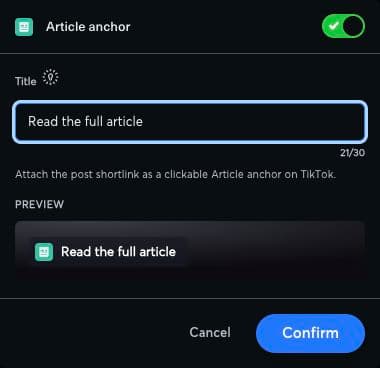
Enter a title and check how the article link will appear in the preview.
5. Why did my post publish without its anchor?#
If TikTok withdraws the account or domain authorization after composition, Nonli omits the anchor at publication when its refreshed account data reflects that change. The post can still publish: the missing anchor does not mean the post was lost. Support can check the publication logs to confirm whether the anchor was omitted at that step.
6. Related guides#
- Create and test a Smart Message to prepare the anchor title.
- Removing URL anchors concerns the
#fragmentpart of a URL, a separate feature from TikTok’s article anchor.