A bot publication enters quarantine when Publish Guard returns anything other than the exact response OK. The quarantined post has not been published and stays out of the normal publishing flow so a person can review the content and the control configuration.
1. Open GuardBox#
Open GuardBox from the main menu. You can also use Display in the quarantine notification when it appears. The current French preproduction interface shown below labels this action Afficher.

Open the affected publication and read the Publish Guard reason stored with it. The reason appears in the right panel below the release action. In the French interface, Appliquer les modifications means Apply changes.
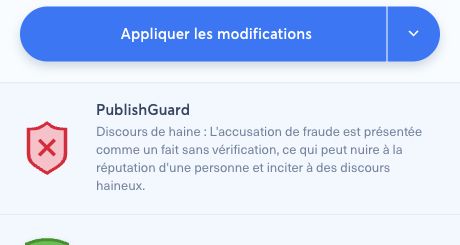
If you are looking across many posts, filter the publications by status, brand, bot, social account, or date to narrow the review.
2. Identify the type of failure#
Classify the case before editing anything.
2.1. Content rejection#
The reason names a rule and explains which part of the message, title, description, or media may violate it. Compare the reason with the source and your editorial policy. A precise reason usually means the template completed normally.
2.2. Configuration or provider failure#
An error about a missing Publish Guard template, missing AI token, provider access, or template rendering is not an editorial verdict. Check the brand template, the AI provider credentials, the fields used by the template, and the bot's inheritance or override. A missing required AI token can also deactivate the bot.
Do not rewrite valid editorial content merely to hide an infrastructure error. Escalate the configuration problem to the appropriate administrator.
3. Correct the post safely#
For a genuine content rejection:
- Confirm the flagged passage against the original source.
- Edit the message, title, description, link preview, alternative text, or media as needed.
- Preserve the intended meaning and record any material editorial change according to your newsroom process.
- If the reason appears wrong, treat it as a possible false positive rather than bypassing it silently.
For a configuration failure, correct the brand template or credential in a controlled test environment first. If a shared policy must change, obtain approval from its editorial owner and re-run the preproduction matrix.
4. Recheck before release#
Editing a quarantined publication does not prove that it now passes the policy.
- In the post composer, click PublishGuard again after the final edit.
- Wait for the result.
- Continue only when Publication validated by PublishGuard appears and the underlying template response is exactly
OK. - Use Apply edition to release the corrected post back into its intended publishing flow.
Before that final action, the panel should show the PublishGuard check at OK:
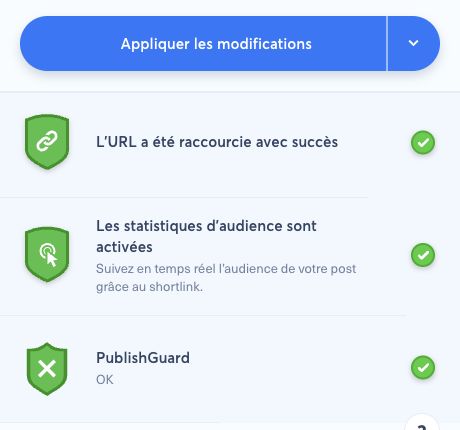
If the check still returns a reason, leave the post in quarantine and repeat the review. Check the schedule before release: a publication whose planned time is already in the past may be published immediately.
5. Manage false positives#
Do not disable Publish Guard on a production bot simply to release one disputed post. Instead:
- save the post identifier, rejection reason, template version, language, and time;
- ask the editorial policy owner to decide whether the post or the rule should change;
- reproduce the case with sanitized synthetic text in preproduction;
- add an accepted false-positive case to the regression matrix when the policy changes;
- require administrator approval before modifying a shared template or bot enforcement.
Keep sensitive or unpublished text out of tickets, chat messages, and test prompts. Share only the minimum sanitized evidence needed for escalation.
6. Safe escalation path#
| Situation | Escalate to | Keep the post |
|---|---|---|
| Clear editorial violation | Editor or moderation lead | In GuardBox until corrected and passed |
| Disputed or ambiguous rule | Editorial policy owner | In GuardBox pending a decision |
| Missing template or rendering error | Nonli administrator | In GuardBox until configuration passes |
| Missing or invalid AI token | Organization administrator | In GuardBox; verify whether the bot stopped |
| Repeated unexplained failures | Nonli support with sanitized evidence | In GuardBox; do not bypass the control |